













 Tiếng Việt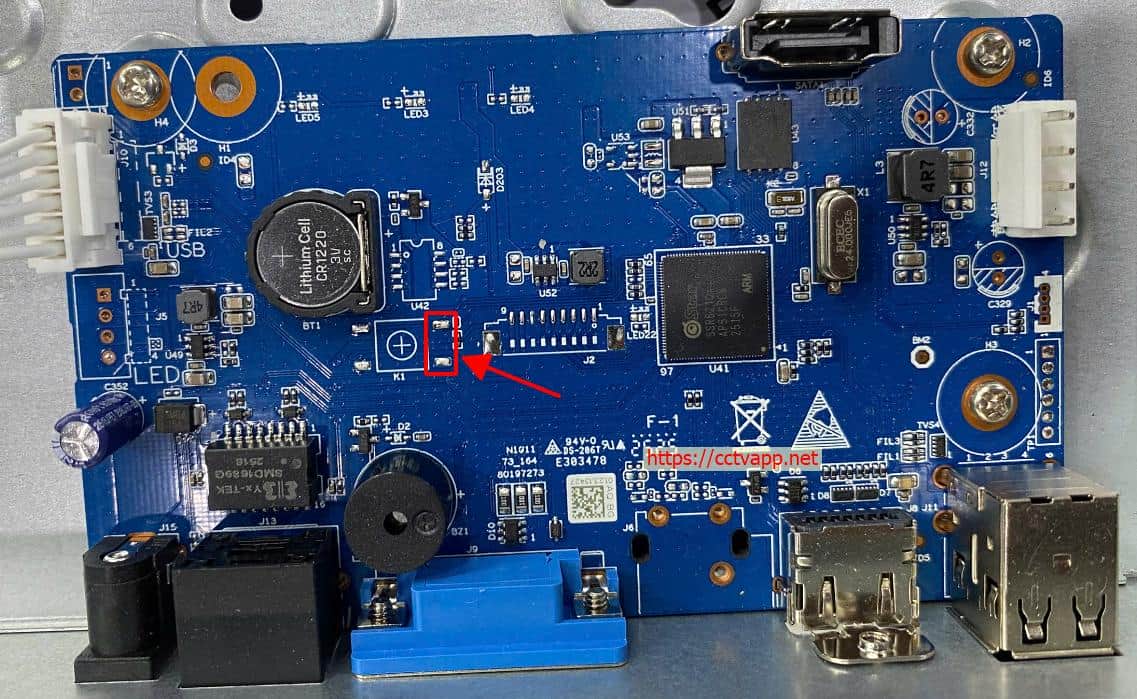
In this guide, you will learn how to perform a hard reset on the NVR1E08HC network video recorder.
Reset Procedure
- Step 1: Use a pair of metal tweezers to short the two pins shown in the image.
- Step 2: Connect the power supply to the recorder and wait for approximately 30 seconds. Then remove the tweezers while keeping the power connected.
- Step 3: The recorder will boot up and restore its factory default settings. Access the device using its default IP address (192.168.1.108) to set a new administrator password.
Good luck! We hope the reset is successful.

