


Today I will show you how to open the modem port to install remote camera viewing settings. Opening a port for the camera and using a domain name will help connect to the camera more quickly when using Cloud P2P. In addition, in case of remote pulling, the port also needs to be opened.
No matter what modem port you open, no matter what network operator you open. You need to prepare yourself for some of the following requirements:
- Determine the IP address of the video recorder and the ports that need to be opened.
- Determine the IP address of the modem (turn on cmd -> type ipconfig -> see the address of Gateway)
- The computer or phone and camera receiver must be connected to the modem’s internet network..
Step 1: Log in to Modem
- Log in to the modem by opening a web browser and typing: http://192.168.1.1 (default). It will appear the modem interface and ask to log in.
- The default account and password of this modem is usually written on the stamp below the modem
- Usually You can log in immediately. If the password is incorrect, it is because it has been changed. Contact the network operator’s Technical Support switchboard for support.
Step 2: Open port on Viettel Modem


- Select Internet -> -> Security -> Port Forwarding -> Create new item Enter information as shown below -> Appy


In which :
- Name: Enter a description (enter any reminder information).
- Protocol: Select TCP
- WAN Host IP Address: Keep the default
- LAN Host: LAN IP address of the device that needs to open the port.
- WAN Port, LAN Host Port: Enter the port you want to open for external access.
To open another Port, continue clicking Create new item and fill in the port information you want to open.


As shown above, I am opening port 80 and 37777 for the device with IP address: 192.168.1.200
Step 3: Check the port opening result
After opening the port. You need to check whether your port is open or not.
- By visiting ping.eu ;then you select Port Check.

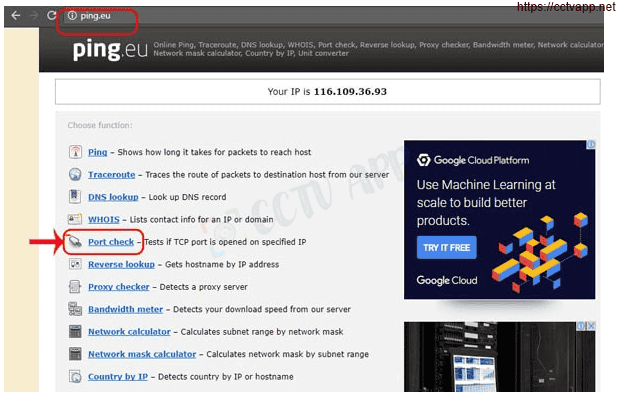
- The browser will redirect to another page where you do the following:

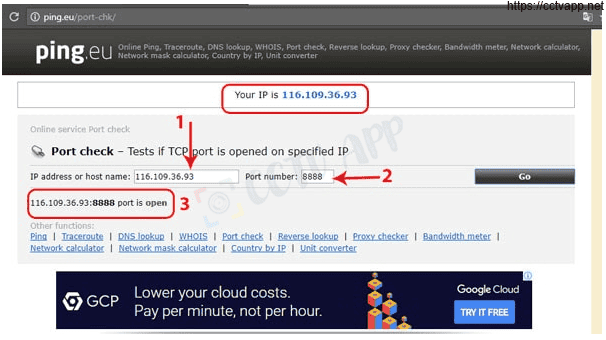
- Click on the series of numbers after the words Your IP is
- In the box IP address or host name that series of numbers will appear
- In the box Port Number you fill in the ports you have opened. click Go.
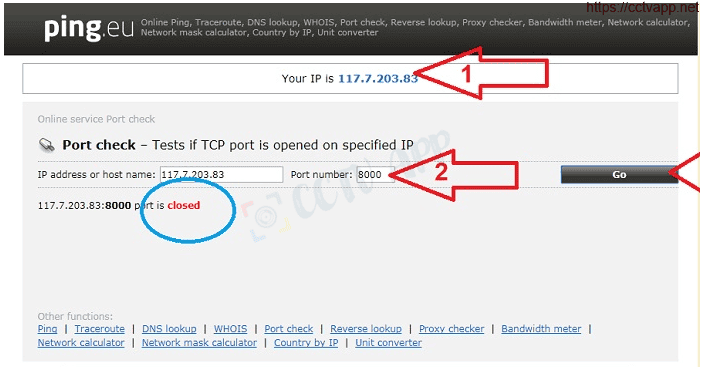
- If the result is as shown above, you have been successful. If the result is as shown below, you have not been successful, you need to recheck the steps above.

Wishing you a successful installation!